AEGIS PULSE · PRODUCT ANALYTICS

Every event tells
part of the story.

See how people discover your app, become members and make purchases. Bring web and mobile events into Sentinel's dedicated Analytics workspace.

Explore integration

Web tracker available. Guardian 3.3.0 brings analytics to Android, iOS and Flutter.

ILLUSTRATIVE CUSTOMER JOURNEY

  1. 01First open · anonymous installation
  2. 02Checkout screen · button click
  3. 03Register success · member identity
  4. 04Purchase · transaction recorded
  5. 05Logout · anonymous again

One installation identity remains on each event through login and logout. Your member ID adds context when signed in.

FROM ACTIVITY TO UNDERSTANDING

Events. Journeys.
Funnels. Revenue.

Configure ordered funnels such as first open → registration or first open → purchase. Review event properties and member journeys in the same Analytics workspace.

Aegis Pulse event examples
first_open / app_openUnderstand first use and subsequent app starts.
screen_view / page_viewRecord app navigation and website page visits.
click_button / custom eventAttach properties such as button_id, screen or product_id.
register_success / identifyConnect installation activity to your own member ID.
purchase / refundMeasure gross, refunded and net revenue by currency.

REVENUE EXAMPLE · FICTIONAL VALUES

Count purchases once.

Gross purchase
Rp99.000
Partial refund
− Rp25.000
Net revenue
Rp74.000

A repeated transaction ID is deduplicated. Distinct purchases need distinct transaction IDs; each refund has its own refund ID. Currencies are reported separately.
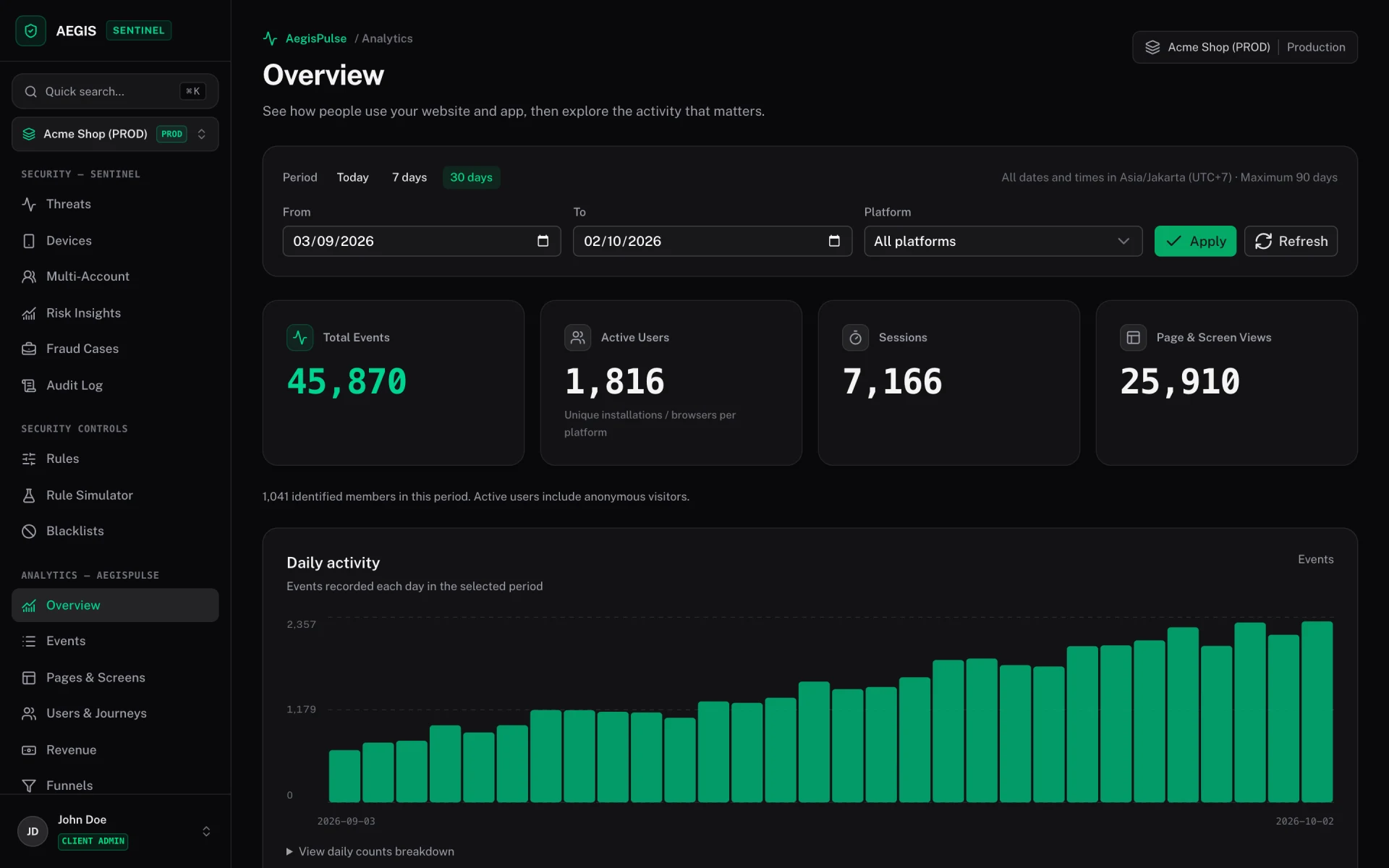
Aegis Pulse / Overview
PRODUCT PREVIEW · DEMO DATA
Aegis Pulse Analytics: Overview
Review total events, active users, sessions and daily activity across web and mobile. Screenshots show demo data from Sentinel’s dedicated Analytics workspace.

YOUR CONFIGURATION, YOUR CONTROL

One console.
Separate security and analytics.

Use Guardian for Pulse alone or alongside security monitoring. Analytics has a separate collection API, tracking key, queue and event limit.

Track across platforms.

Use the browser tracker for websites and native Guardian clients for Android, iOS and Flutter. Flutter's analytics plugin targets Android and iOS.

Separate environments.

Use the tracking key for the intended project/API environment: production, staging or development. Keep test purchases in a test environment.

Set independent limits.

Configure analytics event usage separately from Sentinel security telemetry. Native clients retain bounded queues and retry temporary delivery failures.

START WITH YOUR OWN EVENTS

Connect once.
Track meaningful actions.

Provide your Sentinel origin and public analytics tracking key. Pulse needs no security scan, attestation enrollment or security Client ID.

Flutter analytics example
final pulse = await PulseAnalytics.start(PulseConfig(
  baseUrl: Uri.parse('https://YOUR-SENTINEL-HOST'),
  trackingKey: 'ap_YOUR_32_HEX_CHARACTERS',
));
await pulse.track('screen_view', properties: {'screen': 'checkout'});
await pulse.setUserId('member_123');
await pulse.track('purchase', properties: {
  'transaction_id': 'order_1001',
  'value': 99000, 'currency': 'IDR',
});
await pulse.setUserId(null);
final delivery = await pulse.flush();

Examples use placeholders. Mobile APIs require matching Guardian 3.3.0 packages; older packages do not contain Pulse. Keep one active client and preserve the order of identity changes and events.

TESTED THROUGH THE COLLECTION API

Verified on real devices.

Live analytics ingestion was checked on physical Huawei Android and iPhone devices, through Flutter on Huawei, and through the Flutter iOS simulator bridge. Stored events confirmed member identity, purchase deduplication, refunds and logout.

The verification report records each tested path and its limits. Prolonged offline recovery and physical iOS foreground/process restart remain to be exercised. Mobile background events do not guarantee an app-close callback.